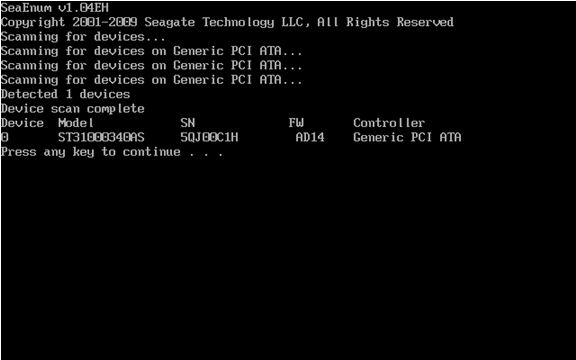
This is a walkthrough on how to upgrade the firmware on a Serial ATA hard drive.
For best results during system startup, it is recommended to disconnect peripherals such as USB storage devices, printers, scanners, etc.
- Download the firmware .iso image that you need from its download page.
- Burn the .iso image to a CD. Please see Document ID: 201431 - How to burn an .iso image onto a CD for instructions.
- Boot up to the CD. Most systems will automatically boot to the CD if it is bootable. If it does not, please consult your system documentation on how to modify the system boot sequence. Macintosh users click here for compatibility and boot instructions.
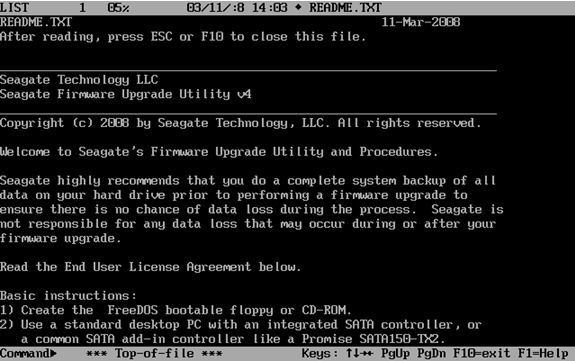
- After the system boots to the CD you will be presented with a README file.
-
Press ESC or F10 to proceed to the next step.
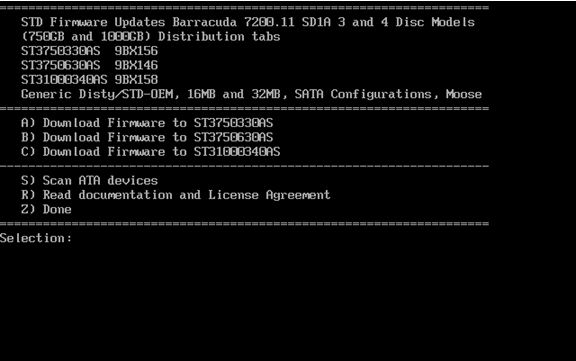
-
To select the appropriate drive, press the corresponding key. In this example the letter C will start the download for the ST31000340AS. Please note that there are different versions of the firmware for each model of drives.
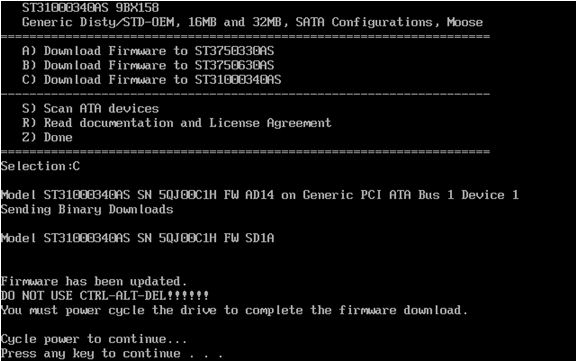
- Once the firmware update is complete, you will be prompted to turn your computer off by pressing any key.
 A soft reset (Control-Alt-Delete) is not sufficient.
- Turn on your computer and remove the firmware CD to allow your system to boot normally into your operating system. Your drive has been updated.
General information: Scanning for devices
You can use the Scan ATA device by pressing the S key at the Selection: prompt to view Seagate drives that are detected.
The scan procedure will display only Seagate drives and will display the current firmware revision loaded on the drive.